Overview
Nucleus enables you to ingest projects and vulnerabilities from Black Duck SCA directly into your Nucleus console using an automated connector. The connector uses the APIs provided by Black Duck SCA to seamlessly sync data into your Nucleus project for use in analysis, triage, automation, and reporting.
The Black Duck connector supports importing project versions and vulnerabilities from Black Duck SCA.
Connector Setup
Connector Setup Checklist
Follow the steps in this checklist to successfully set up this connector:
- API Access
Create an API Token in Black Duck SCA. - Connector Configuration
Create and configure the connector in your Nucleus project. - Data Ingestion
Create an ingest rule to ingest projects from Black Duck SCA.
1. API Access
Account Access
We recommend creating a separate user account to act as a service account instead of a regular user account to ensure maximum security and uninterrupted integration.
- Login to Black Duck SCA.
- In the top right of the menu bar, select the dropdown box for your user name and select Access Tokens.
- Select + Create Token.
- Give the token a meaningful name, set the Scope to Ready Access Only and then click Create.
- Make a copy of the API Token for use when configuring the connector.
2. Connector Configuration
- Open Nucleus and go to Integration Hub > Connector Setup.
- Under the Scanners section, click the Black Duck icon. You will see the following popup:
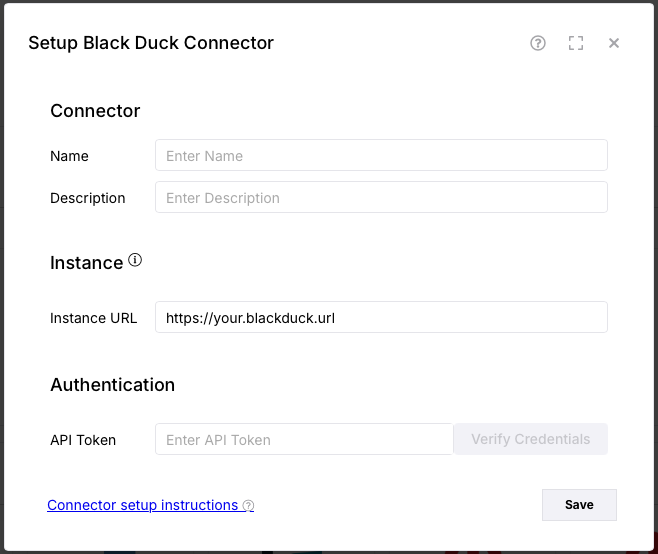
- In the Setup Black Duck Connector popup, enter the following information:
| Field | Description |
|---|---|
| Name | Enter an optional name for your connector. |
| Description | Enter an optional description for your connector. |
| Instance URL | Enter the URL to your instance of Black Duck. |
| API Token | Enter the API Token you created in API Access. |
- Click Verify Credentials.
- Click Save.
3. Data Ingestion
- Go to Integration Hub > Import via Connector.
- Select the Black Duck connector you just created.
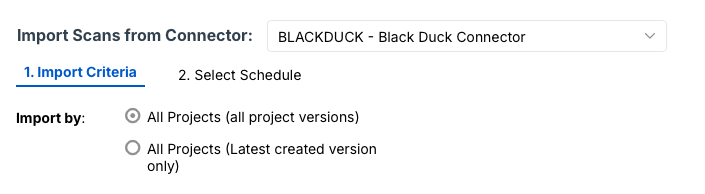
- Select the method that you want to import:
- All Projects (all project versions) - In this method we ingest all project versions that exist for the project.
- All Projects (latest created version only) - In this method we ingest only the most recently created project version per project.
- Select a schedule to import data into the project.
- Click Save & Finish.