-
From within a Nucleus Project, navigate to Analyze > Reports.
-
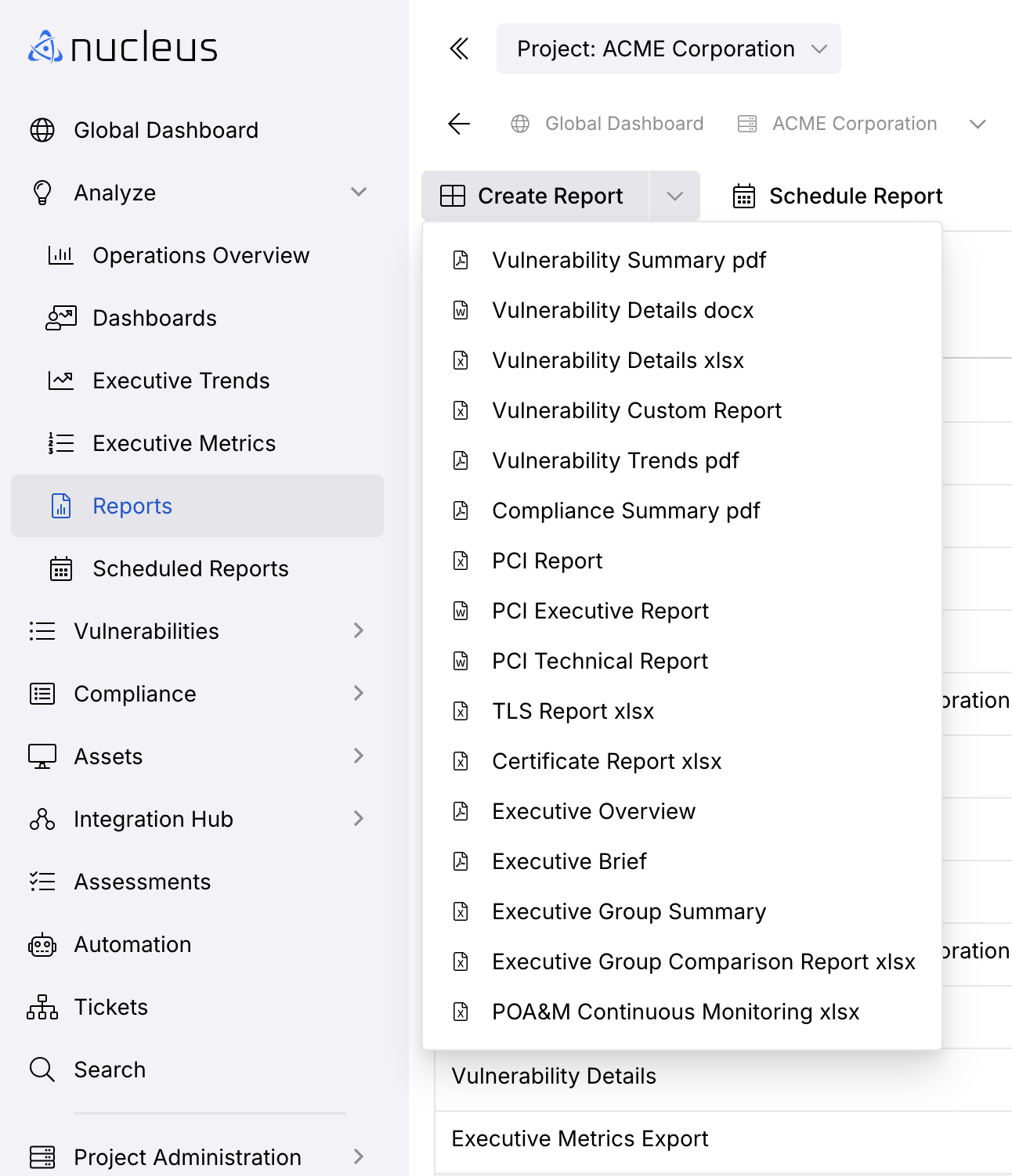
Click the Create Report drop-down.
-
Select the type of report you want to generate from the list.
-
Select your Detailed Report Options such as:
| Fields | Info |
|---|---|
| Report Name | Optional name to help remember the report in the future |
| Severity Levels | The severity levels of vulnerabilities to be included in the report |
| Asset Groups | The groups which you would like to include in the report. |
| Special Exclusions | Types of miscellaneous inclusions or exclusions from the report, such as findings with "Accepted Risk" status. |
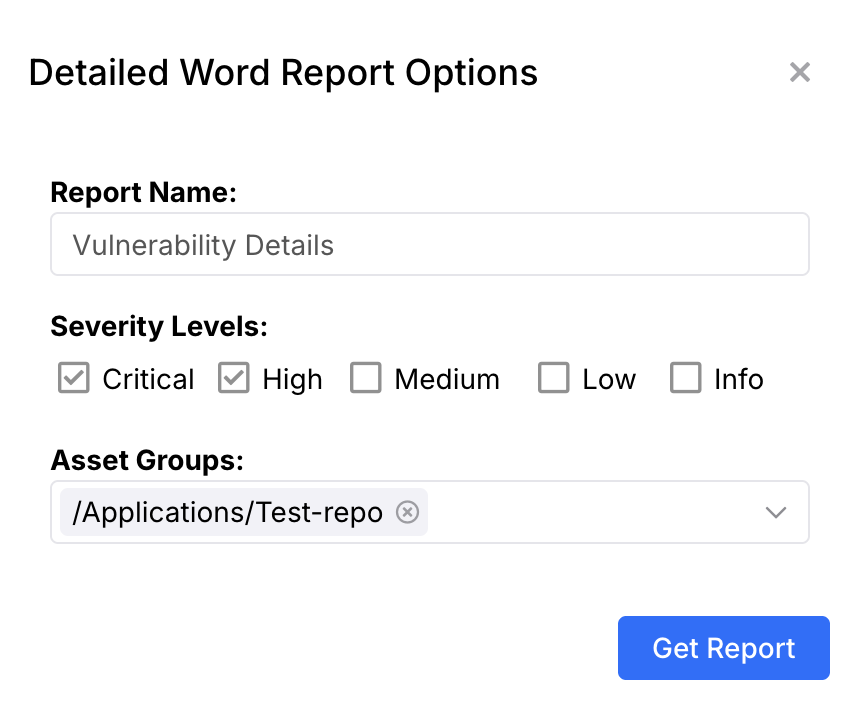
- Click Get Report and download the report by clicking the Download icon in the Actions column of the Reports page.
Edit an existing report's parameters
For Custom Report pdf and Custom Vulnerability Details xlsx reports, you can change the report's filters and parameters after it has been scheduled, without recreating the report from scratch.
-
From within a Nucleus Project, navigate to Analyze > Reports.
-
Click the Scheduled Reports tab.
-
Locate the scheduled report you want to change, then click the Edit Report pencil icon in the Actions column.
-
The full report creation window opens with the report's saved configuration already loaded, including the report name, filter criteria, and schedule.
-
Change any of the parameters you need. Your existing filter criteria appear in the criteria grid so you can add, edit, or remove individual criteria rather than rebuilding the whole set.
-
Click Save. The schedule continues to run using the updated parameters on its next scheduled run.
-
Optional: To confirm the changes before the next scheduled run, click the Run Report Now icon in the Actions column, then review the generated output on the Reports tab.
Note: You need either the Schedule Report or Schedule Export Report permission to edit a scheduled report.
Which reports support parameter editing
| Report type | Editing behavior |
|---|---|
| Custom Report pdf | Opens the full report creation window. All filters and parameters can be changed. |
| Custom Vulnerability Details xlsx | Opens the full report creation window. All filters and parameters can be changed. |
| All other report types | Opens the Edit Scheduled Report window, where you can change the report name, schedule, and email recipients. The Report Parameters tab displays Report parameters cannot be modified here. To change the parameters of these reports, delete the scheduled report and create a new one with the filters you need. |
Cancel a Queued or In-Progress Report
If you need to stop a report that is currently Queued or Scheduled, you can cancel it directly from the Reports page.
-
Navigate to Analyze > Reports.
-
Locate the report you want to cancel in the list.
-
Click the Cancel icon in the Actions column.

- In the confirmation modal, click Cancel Report to confirm, or Keep Running to dismiss.

- The report status updates to Cancelled and a success message appears.

| Note | Details |
|---|---|
| Visibility | The Cancel action is only available while a report is Queued or Scheduled. Once a report is Complete, has an Error, or is already Cancelled, this action is hidden. |
| Permissions | You must have either Create Reports or Delete Reports permission to cancel a report. |
| Scheduled Reports | Cancelling a run from a recurring schedule only stops that specific run. The schedule remains active and future runs proceed as configured. |