-
Open a browser and login to BitBucket.
-
Browse to your avatar, then click on BitBucket Settings.
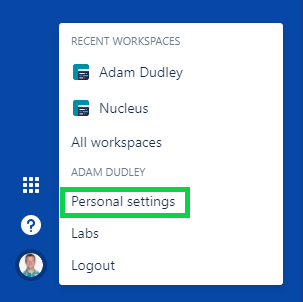
- Click on the menu item under "Access Management" labelled App Passwords
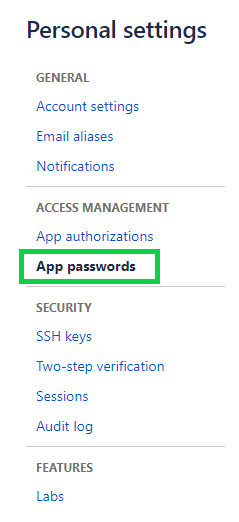
- On the resulting page, click on Create App Password

-
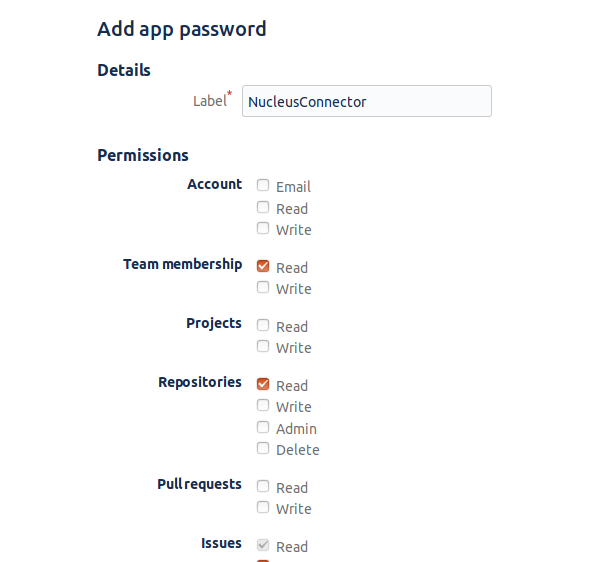
Enter a name in the label for you to remember what this connection is.
-
Check the following boxes
Team Membership > Read
Repositories > Read
Issues > Write & Read
- The result should look something like this:
-
Click Create
-
Copy the resulting App Password to your clipboard.
-
In a 2nd browser window, open Nucleus and browse to Project Administration > Connectors.
-
Under the Issue Trackers section, click the BitBucket icon.
-
In the Setup BitBucket Connector popup, complete the following fields:
If you are using the Nucleus Agent, please refer to the document here
| Field | Description |
|---|---|
| BitBucket URL | Enter the URL to the api of your BitBucket server or cloud instance. |
| Project | Enter in the project name for which this connector is set up. For example, rampant/demo. |
| Application Password | Enter the password which was generated in the BitBucket console (the one copied to your clipboard). |
-
Click the "Save Connection" button and wait for the Success message.
-
Click the "Verify Connection" button. You will be a message to notify you that the connection test was successful. Your connector is now setup properly.
-
Optional: Select a user from the Default Assignee dropdown menu in order to have that user be the default user when manually assigning issues so you don't have to select from the dropdown every time.
-
Close the popup window.
Only users which are on the repo's team will be able to have tickets assigned to them. BitBucket does not allow for users which are not on the team but assigned to the repo to be accessed through the API.