Overview
Nucleus subscriptions mirror the model of many vulnerability scanning tools: A fixed cost per Asset, per year. There are multiple classes of Assets in Nucleus:
- Devices
- Web application urls
- Code & Container repositories
- Cloud resources
Nucleus discovers these Assets through the vulnerability scan results it processes and uses that information to populate and maintain a comprehensive asset inventory.
An easy way to know if your Nucleus subscription will include an asset or application is if it is being scanned. If scan results on an asset or app are in your Nucleus instance then it counts towards your subscription. This occurs even if a scan shows no vulnerabilities, because resources are still expended to ingest and track scan results.
Device assets
A device in Nucleus is typically a computer (server, workstation, laptop, virtual machine, etc.) or a network device (router, switch, firewall, etc.) that is identified by a hostname, FQDN, database, or IP address. Nucleus discovers your devices when ingesting scan results network and infrastructure scanners (Qualys, Tenable, Rapid 7, etc.) by counting the number of scan targets in the result/report.
Web Application urls
A web application url in Nucleus is typically a URL that a web application is hosted on, and is scanned by a DAST system.
Code Repositories
A code repository in Nucleus is typically a custom piece of software/code that is most commonly identified by a git code repository, or container image repository. Nucleus discovers your code repositories when ingesting scan results from SAST, and SCA scanners (Checkmarx, Veracode, Snyk, etc.) by counting the number of code repositories in your Github account.
Multiple branches on the same code repositories and versioning of container image repositories only consume one license.
Cloud Resources
A cloud resource is any asset usually ingested from a CSPM tool (e.g., AWS Security Hub, Wiz, Lacework) and is also not a virtual machine. These would be any cloud resources that can have findings. Additionally, running containers are counted as cloud resources if those are being scanned.
An example would be in AWS, anything that has an ARN and can be scanned with a CSPM tool will count as a cloud resource.
Any cloud resource which is a virtual machine will count towards the device-category assets due to the type of findings that are created on the virtual machine.
Example Subscription
The Acme organization is using:
- Qualys to scan 10,000 IP addresses
- Netsparker to scan 250 live web applications (URLs)
- Veracode to perform static analysis scans for 100 projects, but 50 distinct code repositories with 2 branches each
- PrismaCloud Compute to perform scans for 500 container image repositories
If the scan results for all four tools are imported into Nucleus, the organization will need a Nucleus subscription for:
- 10,000 Devices for Qualys scan targets
- 250 web application urls for Netsparker)
- 50 code repositories for Veracode.
- 500 code repositories for Prismacloud Compute container image repos.
FAQ
Do deleted or inactive assets count towards my license?
No. Once you remove an asset from Nucleus or set an asset to inactive, that asset will no longer count towards your subscription.
Do assets that were discovered in an asset discovery scan count towards my license?
No. Nucleus doesn’t include a host in the license calculation if the host has never been scanned for vulnerabilities. For example, ingesting data from ServiceNow CMDB or AWS EC2 does not count towards your license. A license will only be counted if there have been vulnerability scans against the asset.
This depends on the scan type as well because some tools add an informational finding if there are no vulnerabilities found and Nucleus does count that as a finding and the affected asset will consume a license.
Do assets that were vulnerability scanned but have no findings count towards my license?
Yes. Nucleus includes all assets which have been scanned for vulnerabilities in the license consumption, because NO FINDINGS IS A FINDING. It is valuable to know that you are scanning an asset and it does not have any currently active findings. This includes compliance findings as well as vulnerability findings.
What happens if I hit my license limit?
If you hit your license limit, please contact Nucleus support. We will be happy to assist you! Once your license is updated, the assets which were not showing up in Nucleus when you hit your license limit will now show up in your Nucleus view automatically.
Subscription Status
You can view the status of your Nucleus subscription by Organization and by Project.
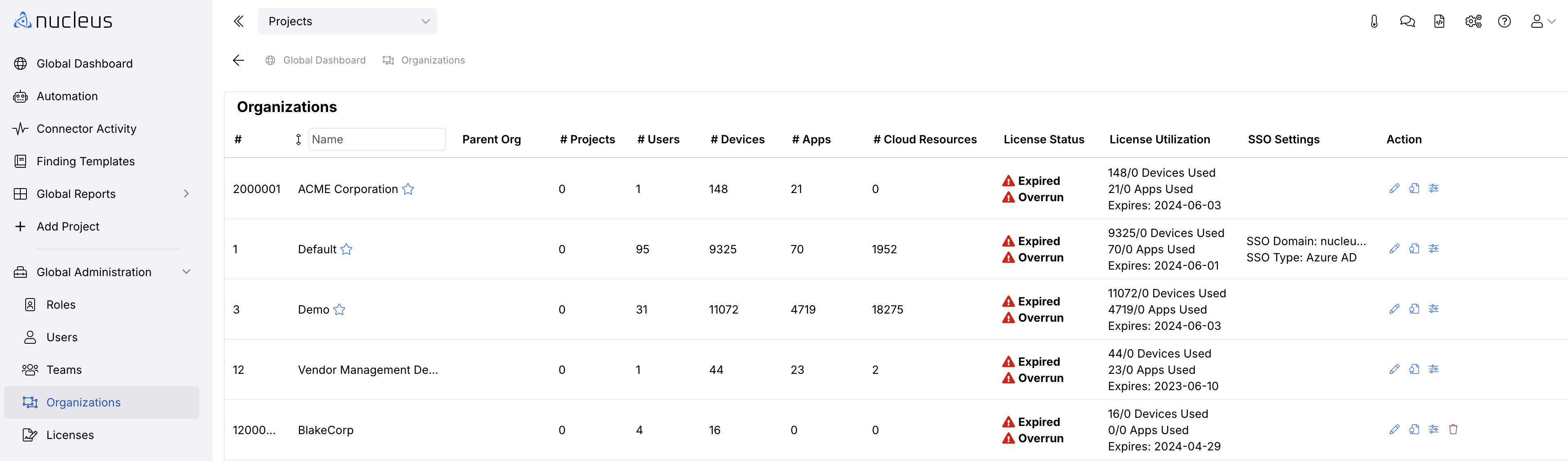
To view subscription status by Organization, navigate to Global Dashboard > Select your project > Analyze > Operations Overview. In the upper right corner, Click the thermometer icon

This page shows License Usage by Organization:
To view the status of your Nucleus Licenses by Project, navigate to the Global Dashboard > Global Administration > Licenses:
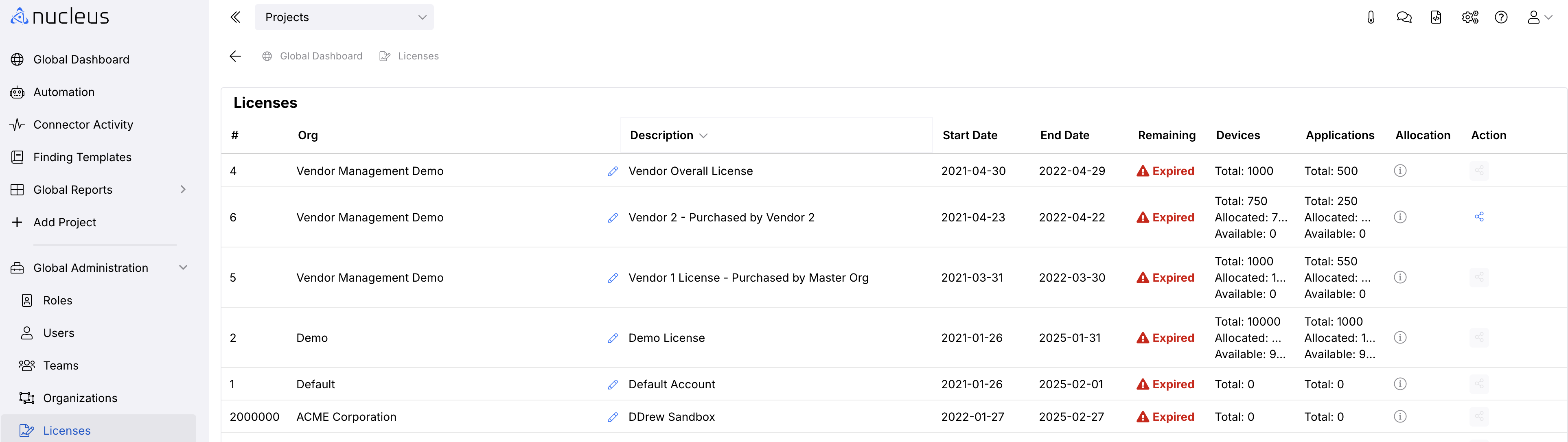
This view shows Licenses details by:
- Subscription start date
- Subscription expiration date
- Number of assets in your subscription
- Number of assets used