Overview
Nucleus enables users to subscribe to a daily or weekly notification to alert you via email when scans do not ingest into the platform for any reason. We're always working on connectors to ensure things run smoothly, but sometimes external scanning tools are down for maintenance, have issues with their APIs, or have bugs in their output that we encounter when ingesting thousands of scans an hour.
Because you rely on Nucleus as the single source of truth for your vulnerability data and need it to be timely and correct, we want you to be able to identify when something's going wrong with your ingests, whether an API key expires, or the external system is down.
You can subscribe to daily or weekly notifications with a summary of all scans that failed to ingest. This allows you to keep on top of any issues, and make sure things continue to run smoothly.
You'll only get a notification email if scans failed to ingest, so most of the time you will not receive an email to reduce noise in your already busy inbox.
Subscribe to notification stream
Nucleus notification streams are contained at the project level, so if you want Nucleus to notify you by email when a scan ingest fails, do the following:
-
From within a Nucleus Project, navigate to Project Administration > Edit Project Info.
-
In the Edit Project pop-up check the "Notify emails when scan ingest fails" box and add a valid email address.
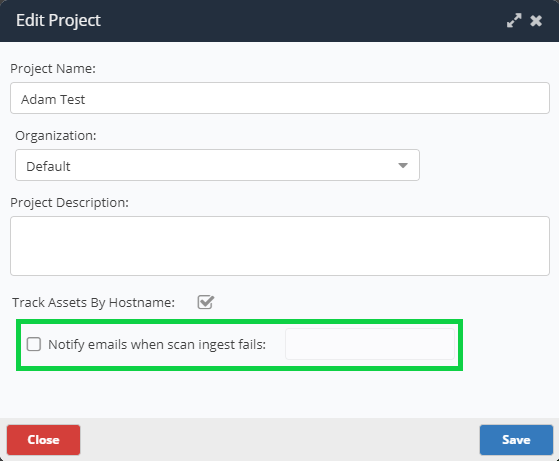
- Select whether you want to be notified daily or weekly.
- Click Save and you're done! You will now receive notifications when scans fail to ingest into the platform with a summary of why the scans did not ingest correctly.
For help, please contact support at [email protected].