Understanding Nucleus Field Mappings
This section is intended as a reference for ServiceNow administrators to understand the how Field Mappings are used to customize the content of tickets created by Nucleus and how they are previewed in the Nucleus UI.
There are two ways to view and manage Field Mappings in the Nucleus Security app: After logging in to your ServiceNow instance with admin permissions:
Manage Projects
- Log in to ServiceNow with admin permissions.
- Click the All navigation menu, search for Nucleus Security, select Manage Projects.
- Click on the Project ID corresponding to the Nucleus project you want to configure.
- Field mappings for the selected project display as tabs at the bottom, grouped by Action:
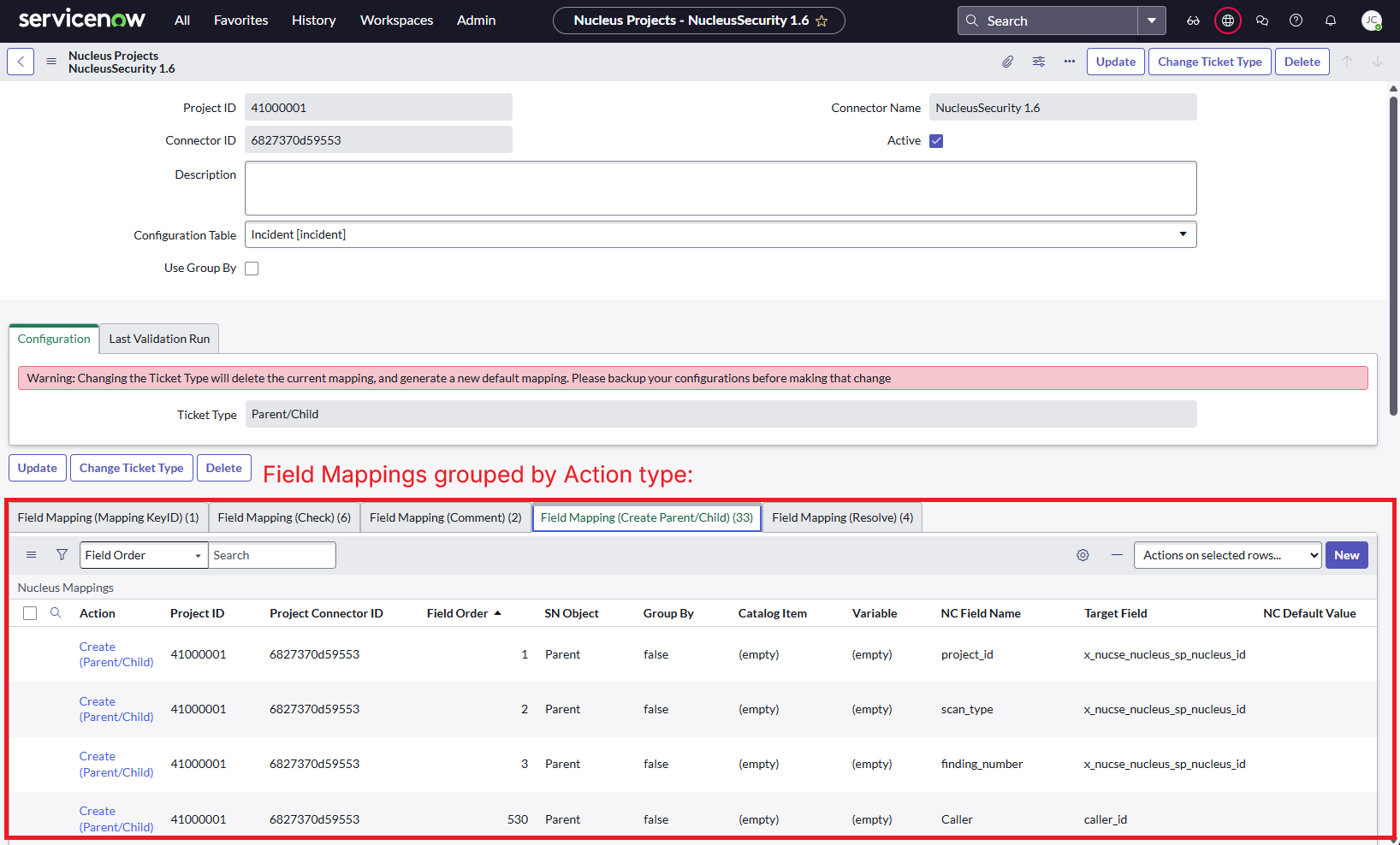
- See Managing Projects for additional information about configuring and validating projects.
Field Mappings
- Log in to ServiceNow with admin permissions.
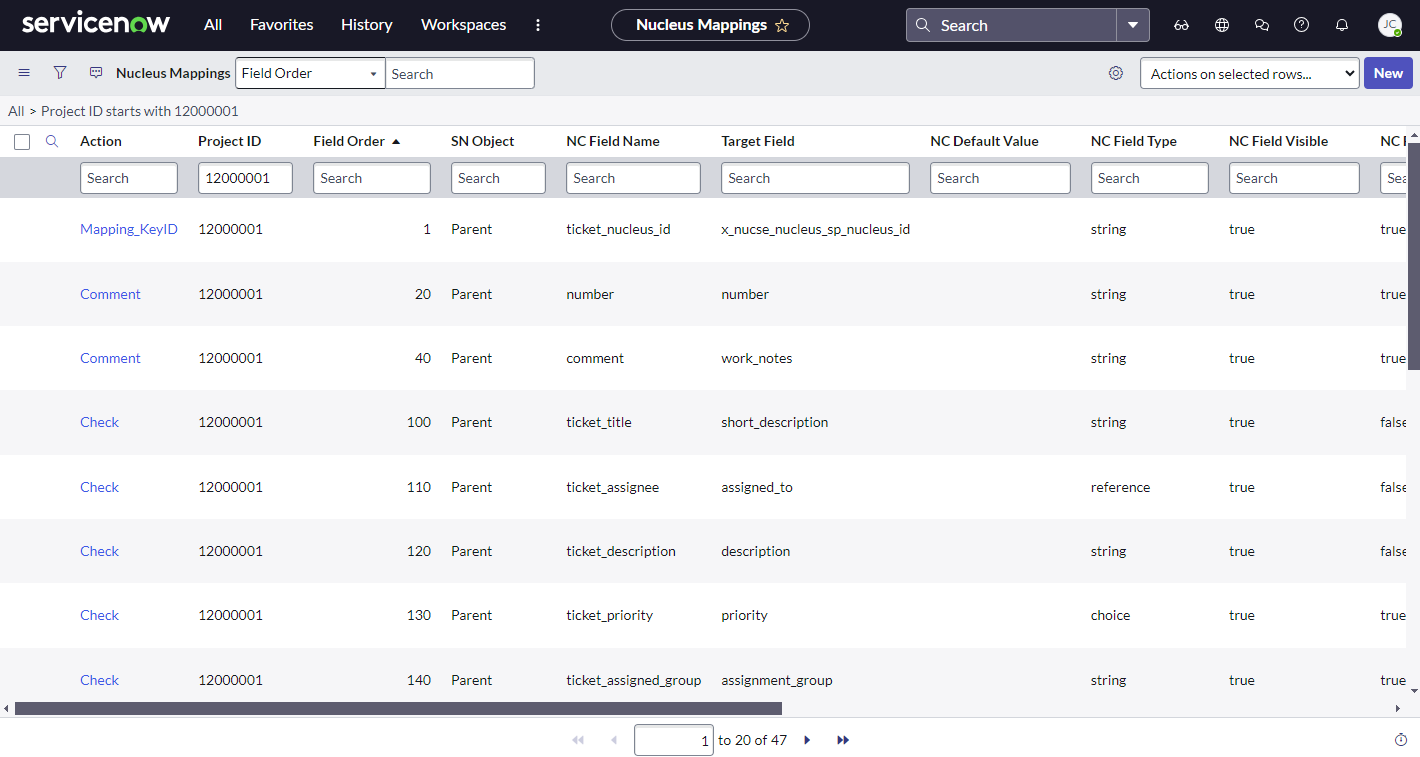
- Click the All navigation menu, search for Nucleus Security, then select Field Mappings:
Nucleus Mapping Table Schema
Each record in the Nucleus Mapping table has the following fields:
| Field | Description |
|---|---|
Action |
|
SN Object |
Must be either Parent, Child, Single, or Catalog Item. |
Insert Only |
If checked, this field will be set upon ticket creation, but will be modified on subsequent ticket updates. |
Field Order |
This has two purposes: • Controls the order in which the app processes fields (and has reserved ranges for internal fields). • Controls the display order of fields in the Nucleus UI when NC Field Visible is set to True for Create (Single) or Create (Parent/Child) actions. |
IsActive |
If Disabled(unchecked), the record is ignored. |
Nucleus Project |
This value is set by default to the Nucleus Project name in which the connector was created, you should not need to modify this property. |
Group By |
If enabled, tickets will be grouped based on the unique values received from Nucleus for the specified NC Field Name. Only enable for mappings where SN Object is "Child" in parent/child configurations. For more information, see Dynamic ticketing using Group By. |
Override |
If Enabled(checked) for either Parent or Child mappings, the SN Default Value will be used to populate the Target Field regardless of values being passed from Nucleus. |
CMDB Override |
If 'Enabled(checked), we will attempt to set the Configuration Item based on the value passed for the specified NC Field Name. See Creating Custom Field Mappings for more information including an example use case. |
NC Field Name |
This field serves two purposes:
|
NC Default Value |
The default value if no value is specified in Nucleus. |
NC Field Mandatory |
Determines if the field will be mandatory in the Nucleus UI. |
NC Field Visible |
Only relevant for the Create (Single) and Create (Parent/Child) actions. Controls if the field will be visible in Nucleus when creating tickets or ticketing rules. This only affects fields not included in the list of available fields from Nucleus when creating tickets. |
NC Field Length |
The length of the field that is enforced in Nucleus. The field will not be allowed to be longer than this in the Nucleus UI. When manually creating vulnerabilities or tickets in ServiceNow, ticket descriptions may have a high number of characters. NC Field Length can be updated to any value to support manual ticket creation of any size. |
NC Field Type |
The field type that is shown in the Nucleus UI. String, Integer, Choice, reference, or date. |
NC Object Key |
Select asset_infowhen mapping fields from Addtional Metadata on Assets, or finding_references when mapping fields from Finding References. See Creating Custom Field Mappings for more information including a examples of Additional Metadata and Finding References mappings. |
Target Table |
Specifies the Task task table the mapping will write to. This should always match the current value specified for Configuration Table on the project. |
Target Field |
The name of the column in the specified Target Table to map to. |
Parent Reference Field |
Deprecated: this option is no longer used and can left set to "--None--" |
SN Default Value |
The default value used if no value is received from Nucleus for the specified NC Field Name. |
SN Field Mandatory |
Determines if the field is mandatory in the ServiceNow App. If set to True and no value is set, the entire record will be rejected. |
Set Same as Parent |
If Enabled(checked), the Target Field will be set to the same value as set on the field in the Parent ticket. This option only appears when configuring Child mappings in parent/child configurations. |
SN Table Name |
Used for Choice and Reference type fields. The table to look up choices/references from. |
SN Lookup Display Fields |
Used for Choice and Reference type fields. The field(s) to return to Nucleus when querying the the table specified in SN Table Name. This can be a comma separated list. |
SN Lookup Query Fields |
Used for Choice and Reference type fields. The fields that will be queried when doing a lookup on the table specified in SN Table Name. |
Actions
Mapping_KeyID action
There is a single mapping record containing the Mapping_KeyID action required for each Nucleus project which is created automatically as part of the default Field Mappings.
NOTE: It is VERY rare that you should need to directly modify the Mapping_KeyID mapping, as it is required for linking Nucleus findings to ServiceNow records. Please contact support before modifying this mapping.
In cases where you are configuring Nucleus to write to a non-default Task table (anything other than Incident), you may need to ensure that the target table includes the required field used to store the Nucleus mapping identifier. If this field does not exist on the target table, it must be created and the Mapping_KeyID configuration updated accordingly to match the field name.
The Mapping_KeyID mapping is configured with the following properties:
- Field Order set to
1. - IsActive set to
True. - NC Field Name set to
ticket_nucleus_id. - SN Object set to
Single(for Single configuration) orParent(for Parent/Child Incident configuration). - NC Field Length and SN Field Length set to
1000. - NC Field Type and SN Field Type set to
String. - NC Field Mandatory and SN Field Mandatory set to
True. - Project ID set to the Nucleus Project ID.
- SN Field Name set to
x_nucse_nucleus_sp_nucleus_id. - SN Table Name set to the name of the Configuration Table. By default, Nucleus Field Mappings are set to
Incident. See Creating Tickets in Non-Incident Task Tables for details on how to change the type of Task tickets to create.
Check action
Check actions are used to pass information from ServiceNow to Nucleus when previewing ServiceNow tickets in the Nucleus UI.
The following Check action are created as part of the default Field Mappings:
| NC Field Name | Description |
|---|---|
ticket_assignee |
The assigned user of the ticket, typically the assigned_to column. NC Field Type should be "reference", and SN Field Type should be "reference". |
ticket_description |
The description of the ticket, typically the description column. |
ticket_priority |
The priority of the ticket, typically the priority column. NC Field Type should be "Choice", and SN Field Type should be "integer". |
ticket_assigned_group |
The assignment group of the ticket, typically the assignment_group column. NC Field Type should be "reference", and SN Field Type should be "reference". |
ticket_status |
The status of the ticket, typically the state column. NC Field Type should be "Choice", and SN Field Type should be "String". |
ticket_title |
The title of the ticket, typically the short_description column. |
You can add custom Check action mappings to display additional fields from ServiceNow when previewing tickets in the Nucleus UI.
Comment action
Comment actions are used to facillitate creating and viewing comments on ServiceNow tickets via the Nucleus UI.
NOTE: It is VERY rare that you should need to directly modify the Comment mappings, please contact support before modifying this mapping.
The following Comment action mappings are created as part of the default Field Mappings:
| NC Field Name | Description |
|---|---|
comment |
The user/bot comment. Typically the comment column. SN Table Name should match the name of the selected Configuration Table for the project. |
number |
The number of the ticket to comment on. Typically the number column. SN Table Name should match the name of the selected Configuration Table for the project. |
Create (Single) and Create (Parent/Child) actions
Create (Single) and Create (Parent/Child) actions are used to configure how content from Nucleus is used to populate target fields in ServiceNow tickets created by Nucleus.
The following Create action mappings are created as part of the default Field Mappings:
| NC Field Name | Description |
|---|---|
project_id |
|
scan_type |
|
finding_number |
|
finding_justification_key |
Only relevant for Parent/Child Incident.
|
host_id |
Only relevant for Parent/Child ticket type.
|
| All other fields | For Single and Parent SN Objects, the field order must be 100 or above and each field order must be unique for that project ID.For Child SN Objects, the field order must be 1020 or above and each field order must be unique for that project ID. |
For more information on creating custom Field Mappings, see Creating Custom Field Mappings.
NOTE: Default Field Order values shown represent recommended ordering for how mappings are processed. Automatically generated mappings may not always use these exact values and can appear with higher or non-sequential numbers.
When reviewing Field Order values, focus on maintaining relative order and uniqueness rather than matching exact values.
Available Fields from Nucleus for Field Mappings
Available Fields from Nucleus for Field Mappings
Core Finding Fields
The following fields represent general information about the finding and can be mapped to the Single object for Single configurations, or the Parent and Child objects for the Parent/Child configurations:
ticket_titleticket_descriptionfinding_urlproject_idfinding_numberscan_typefinding_namefinding_descriptionfinding_recommendationfinding_severityfinding_discoveredfinding_last_seenfinding_exploitablefinding_cvesfinding_references(multiple, varies by scan source)finding_cvss_v3_vectorfinding_cvss_v2_vectorfinding_cvss_v3_scorefinding_cvss_v2_scorefinding_risk_score
Nucleus Insights Threat Intelligence Fields
The following fields provide Nucleus Insights Threat Intelligence, offering AI-powered context on exploitation status, threat activity, exploit availability, and remediation signals for a finding. These fields are derived from Nucleus analysis and intelligence sources and are intended to support vulnerability prioritization and remediation decisions.
The following fields represent general information about the finding and can be mapped to the Single object for Single configurations, or the Parent and Child objects for the Parent/Child configurations:
nucleus_threat_ratingnucleus_ease_of_exploitationnucleus_likely_to_be_exploitednucleus_exploitednucleus_widely_exploitednucleus_exploit_weaponizednucleus_exploited_by_malwarenucleus_exploited_by_ransomwarenucleus_public_exploit_availablenucleus_private_exploit_availablenucleus_remote_exploitationnucleus_zero_daynucleus_zero_day_previouslynucleus_actorsnucleus_malwarenucleus_impacts_otnucleus_exploitation_consequencenucleus_fix_availablenucleus_patch_availablenucleus_mitigation_availablenucleus_media_mentions_30daynucleus_media_mentions_90daynucleus_media_mentions_180daynucleus_media_mentions_alltime
Nucleus Insights fields are dynamically derived from Nucleus analysis and third-party intelligence sources. Values may change over time as exploitation activity, threat signals, remediation availability, or media coverage evolves. Fields reflect the current threat context at the time the ticket payload is generated.
Finding Instance Fields (Child-only)
The following fields represent information specific to a finding instance or asset, and can ONLY be mapped to the Child object for Parent/Child configurations:
- Finding Instance fields
host_idfinding_justification_keyinstance_severityfinding_portfinding_servicefinding_pathfinding_outputfinding_discoveredfinding_last_seenfinding_code_snippetfinding_http_requestfinding_http_responsefinding_line_numberfinding_packagefinding_references(multiple, varies by scan source)instance_risk_scoreassigned_team_idassigned_team_namedue_date
- Asset fields
- Generic/general
asset_idaliasasset_nameasset_name_secondaryasset_notesasset_publicasset_usersasset_inactive_dateasset_groupsasset_criticalityasset_typeasset_data_sensitivity_scoreasset_complianced_scoreasset_criticality_scoreasset_info(multiple, varies by scan source)support_team_idowner_team_idowner_team_namesupport_team_name
- Host type assets
operating_system_nameoperating_system_versionip_addressip_address_secondarymac_addressasset_location
- Container Image type assets
operating_system_featuresimage_tagsimage_repoimage_manifest_digestimage_distroimage_config_digestimage_registryimage_secondary_registriesimage_platform_osimage_platform_archimage_platform_arch_featuresimage_platform_arch_variantoperating_system_version
- Application type asset
app_versionbranchrepo_url
- Generic/general