Overview
Automation workflow rules are one of the main ways to automate vulnerability management workflows within Nucleus.
As data flows into Nucleus from vulnerability scanners, Nucleus processes the data and compares the newest results to the current latest findings present in the Nucleus console. Automation rules let you define what Nucleus does with different triggers based on new information, such as dynamically grouping assets that are discovered, assigning risk attributes to assets, processing vulnerabilities and compliance findings, and creating tickets in multiple external ticketing systems automatically.
This allows you to predefine workflows based on criteria of your choosing, automating many of the administrative processes associated with vulnerability management.
What you can do
With Nucleus automation workflows, you can create rules with flexible criteria for many of the common scan, vulnerability, and asset-related tasks you might currently do manually.
Be Creative
Automation rules can be combined in an almost infinite number of ways for maximum flexibility. The rules are not prescriptive and you can automate many tasks using the Nucleus automation engine.
Types of Automation Workflows
There are currently seven types of workflows you can automate in Nucleus:
Type | Info |
|---|---|
Synchronize all the assets in your inventory management tools to Nucleus automatically on a recurring schedule. | |
Vulnerability Scan Ingest | Import scans from all your scanning tools automatically on a recurring schedule. |
Process the assets discovered by your scanning tools coming into Nucleus automatically using a set of asset criteria that you define. | |
Process the findings discovered by your scanning tools coming into Nucleus automatically using a set of finding and asset criteria that you define. | |
Create tickets in external ticketing and issue tracking tools like Jira and ServiceNow based on a set of asset and vulnerability criteria that you define. Plus, you get bidirectional updating on tickets and issues created in Nucleus. | |
Get notified (or notify others) in-app, via email, and SMS automatically when new vulnerabilities are discovered using a set of criteria that you define. | |
Remove or deactivate assets automatically from Nucleus on scan imports using a set of criteria that you define. | |
Ignore assets automatically on scan imports using a set of criteria that you define. |
Note
The order in which automation rule types run is as follows: Asset Inventory Sync > Asset Ignore > Asset Processing > Finding Processing > Asset Removal.
All vs. Any Trigger
When creating automations you'll often encounter the choice of All vs. Any Criteria for triggering a workflow.
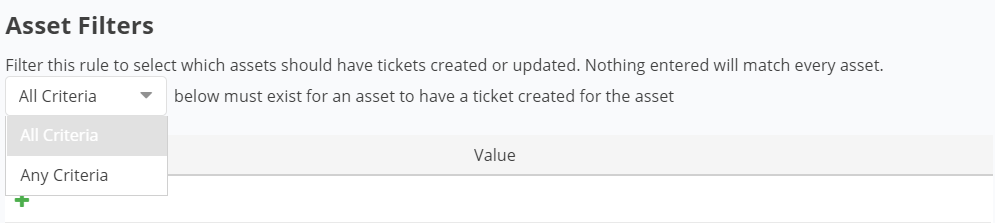
This means that any or all of the fields or criteria must be met to trigger this rule. This is by design for maximum flexibility.
Benefits
Dynamically group assets & assign risk attributes as they are imported into Nucleus.
Save time by getting all the data from your different tools pulled into Nucleus automatically on a schedule.
Automate many of the administrative processes associated with Vulnerability Management workflows like assigning findings and setting due dates.
Improve collaboration and streamline remediations by automating ticket creation on discovered vulnerabilities.
Notify the right people to respond to vulnerabilities when you connect Nucleus to notification apps.